

In this article
Every time you edit a page on your company website, add a new product listing, or fix a typo on a blog post, without calling a developer, you’re using a CMS. It’s one of those pieces of software nobody talks about at parties, but almost nothing online would work without it. Here’s what it actually is, how it works, and why it has quietly become non-negotiable for most businesses.
What is a CMS?
One mix-up worth clearing up early: a CMS is not the same thing as a DAM (digital asset management system). A DAM is where your files live, your images, your videos, your PDFs. A CMS is what turns those files, along with your text, into actual pages people can read. Think of a DAM as a filing cabinet and a CMS as the person who decides what goes on display.
How Does a CMS Work?
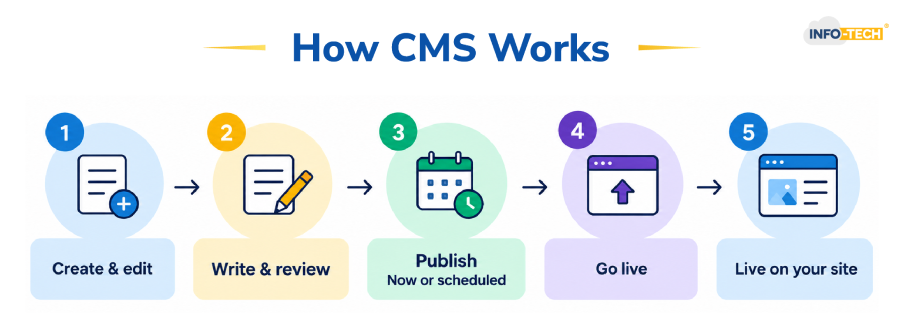
In practice, that usually plays out in three steps:
- You write or edit something, and it gets reviewed if your team works that way.
- It’s published; either right away or on a schedule you set out.
- It shows up wherever it’s supposed to, your site, your app, sometimes both, without you touching any code.
What are the Different Types of CMS?
| Type | What makes it different | Good fit for |
| Traditional (head-on) | You edit and preview pages in one place | Small businesses, blogs, marketing sites |
| Headless | Content lives separately, delivered through APIs | Apps, multiple devices, dev-heavy teams |
| Hybrid | A mix of both, depending on the content | Teams that need flexibility |
| Open source | Free, but you maintain it yourself | Businesses with in-house developers |
| Commercial | Paid, but comes with vendor support | Teams that want a safety net |
Why do Businesses Need CMS?
- Marketing stops waiting in line behind engineering for simple updates.
- Multiple people can work on the same site without emailing files back and forth.
- SEO tools usually come built in, so metadata and sitemaps aren’t a separate project.
- Branding stays consistent because everyone’s pulling from the same templates.
What Should You Look for Before Choosing a CMS?
- Publishing permissions – so junior team members can’t accidentally push a half-finished page live.
- A staging area – somewhere to test a redesign before the public sees the mess.
- Built-in analytics – ideally without needing three separate logins to see how content is performing.
- Real security – firewalls, regular vulnerability scans, and some form of DDoS protection.
How is AI Changing Content Management?
Which CMS Should You Use?
Take HRMS, for instance. If your company runs an internal intranet or employee knowledge hub, that content often needs to reflect what’s sitting in your HR system, who’s in what role, which department someone belongs to, what policies apply to them. A Content Management System that can pull from HRMS data means onboarding pages, internal announcements, and policy documents stay accurate without someone manually updating them every time a team reshuffles.
Accounting and payroll software tend to stay further in the background, but they still show up indirectly, think client-facing billing pages, invoice templates, or a customer portal that needs to reflect real account and payment data. A Content Management System that can pull in that information means clients see an accurate picture instead of static, outdated pages.
And CRM is where this connection matters most for anything customer-facing. When your CMS and CRM are actually talking to each other, content can adjust to who’s viewing it, a returning customer, a lead mid-negotiation, someone flagged for renewal, rather than showing the same generic page to everyone.
None of this means you need a single vendor that does it all. It just means that when you’re comparing CMS options, “does this integrate with what we already run” deserves as much weight as any feature list.
CMS Frequently Asked Questions
What does CMS stand for?
CMS stands for content management system.
What is a CMS website?
A CMS website is simply a website built and run using a content management system, rather than one made of hand-coded pages.
What websites use CMS?
Almost every website type runs on a CMS: WordPress for blogs, Shopify for online stores, Wix or Squarespace for small business sites, and Drupal, Adobe Experience Manager, or Sitecore for larger, enterprise-grade sites.
Is CMS a CRM system?
No, they’re related but not the same system. A CMS manages website content, while a CRM manages customer relationships and data.