

In this article
- 1. What Is MyTax Malaysia?
- 2. Who Needs to Register for MyTax?
- 3. Where Do You Register for MyTax?
- 4. How Do You Start MyTax Registration?
- 5. What Information Do You Need to Fill?
- 6. What Documents Need to Be Uploaded?
- 7. How Long Does Approval Take?
- 8. How To Activate Your MyTax Account?
- 9. Concluding Thoughts
- 10. MyTax Malaysia FAQs
If you’ve started working in Malaysia or recently began earning income, there’s a good chance you’ll need to register for a MyTax account. It is the online tax system managed by LHDN, where you can file taxes, check your tax details, make payments, and receive updates from the tax office.
A lot of first-time users get confused when they see terms like TIN, e-Daftar, or Digital Certificate. But honestly, the process is much easier once you know what each step means. Here’s a simple guide on how to register for MyTax Malaysia for the first time and activate your account successfully.
What Is MyTax Malaysia?
MyTax is LHDN’s official online portal for tax matters in Malaysia. Instead of going to the tax office, most things can now be done online through this portal. You can use it to:
- Register for income tax
- File your yearly tax return
- Pay taxes online
- Check refunds and notices
- Update your information
The portal also includes e-Filing, which is the section used to submit your income tax every year.
Who Needs to Register for MyTax?
Generally, anyone earning taxable income in Malaysia should ideally register for a tax account. This includes people like:
- Salaried employees – Individuals whose annual income exceeds RM34,000
- Freelancers
- Business owners
- Foreigners working in Malaysia
- People earning side income
Note: Even if your company already deducts PCB or monthly tax from your salary, you may still need to register and file taxes on yearly basis.
Where Do You Register for MyTax?
You can register online through the official e-Daftar page.
Once the page opens, you’ll see the section for ‘tax identification number registration’. Before you begin your registration process, prepare these first:
| Item | What You Need |
| Identification | IC or passport |
| Active email address | |
| Phone Number | Mobile number |
| Documents | IC front & back or passport copy |
If you’re Malaysian, a clear copy of both sides of your IC is usually enough to register. Foreigners may also need documents like a work permit or proof of residence in Malaysia.
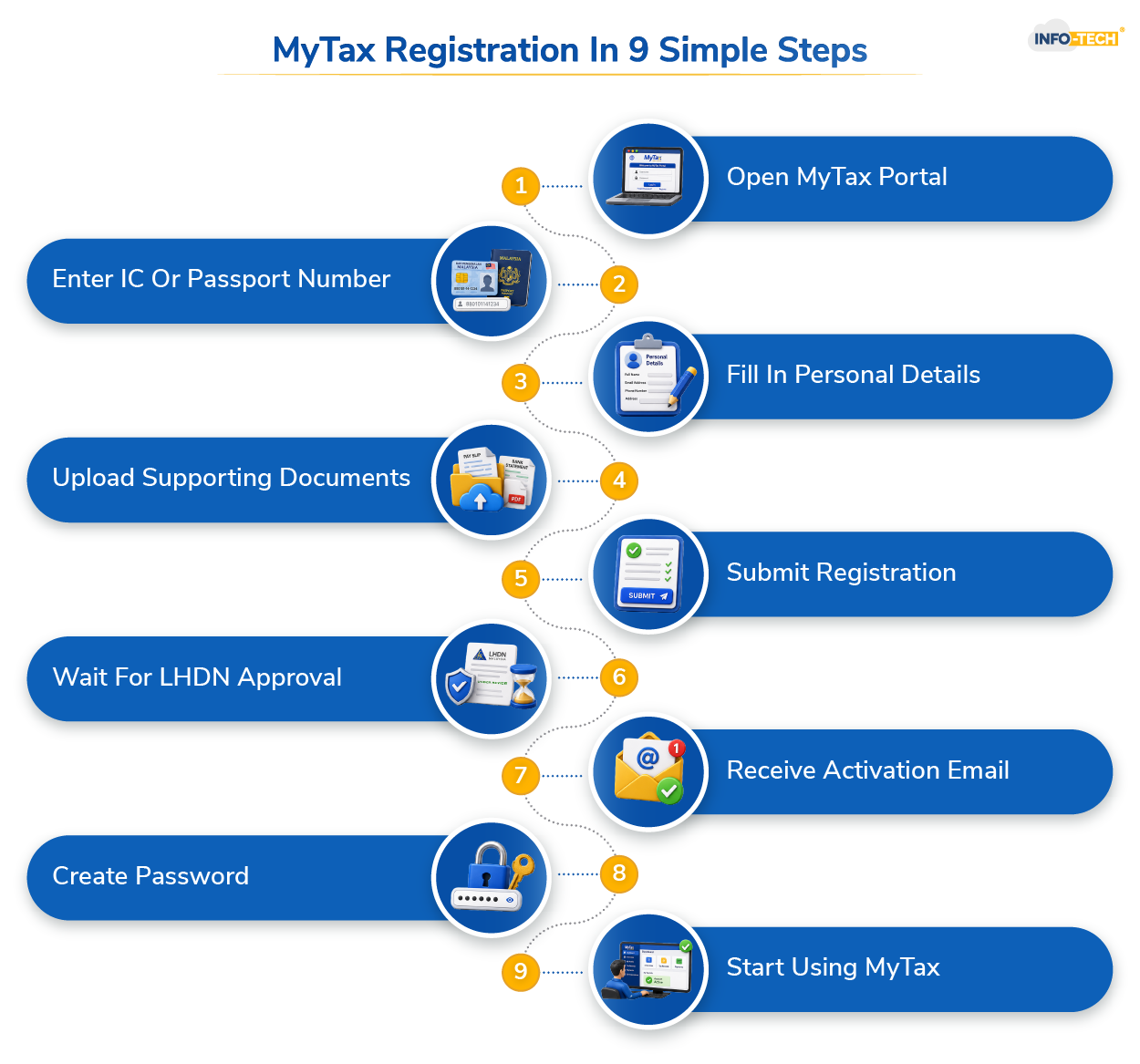
How Do You Start MyTax Registration?
First, choose “Individual” under taxpayer type. Then select your reference type:
- Malaysians should choose Identification Card Number
- Foreigners should choose Passport Number
After that, enter your:
- IC or passport number
- Email address
- Phone number
- Security code shown on screen
Then click “Search.” If you already have a tax record, your TIN number may appear automatically.
If you haven’t registered before, you’ll see an option called “e-Daftar.” Click it to continue. This will bring you to the registration form.
What Information Do You Need to Fill?
The form will ask for important basic details such as:
- Full name
- Date of birth
- Address
- Contact information
- Employment details
Note: Make sure all provided details matches ones in your official documents. Wrong details can lead to delayed approval.
What Documents Need to Be Uploaded?
Malaysian citizens usually need to upload:
- Front copy of IC
- Back copy of IC
Foreign applicants normally need:
- Passport copy
- Supporting residence documents
Make sure the images are clear before uploading. Once everything is filled in, review your details properly. Then click “Submit” or “Send.”
Note: You’ll receive an application reference number after submission. Save it somewhere in case you need to check your application later.
How Long Does Approval Take?
LHDN usually takes a few working days to process the registration. Many users receive an approval email within about 5 working days.
The email often comes with the subject: “PERMOHONAN NO. PIN (TELAH DILULUSKAN)”. This means your application has been approved.
How Do You Activate Your MyTax Account?
After approval, LHDN will send you an activation email. Open the email and click the activation link provided.
The link is usually valid for only 2 days, so it’s better not to wait too long.
Go to the MyTax portal: Choose your identification type and enter your IC or passport number.
If no Digital Certificate exists yet, the system may ask you to continue using “e-CP55D.” You’ll then need to verify your details and continue.
The final step is setting your password and security phrase.
After entering the required details, click “Setuju & Hantar.” Once completed, your MyTax account will be active.
After logging in, you can start using all the MyTax services online. This includes:
- Filing income tax through e-Filing
- Checking refunds
- Making tax payments
- Viewing tax notices
- Updating your tax profile
Everything can be managed directly from your dashboard without visiting LHDN physically.
Concluding Thoughts
Getting started with MyTax for the first time can feel a little confusing, especially if you’ve never dealt with income tax or online government portals before. The good thing is that the registration process is actually quite straightforward once you go through it step by step. Since most tax services in Malaysia are now handled online through LHDN’s MyTax portal, having an active account has become important for employees, freelancers, and business owners alike. If you have your documents ready and enter your details correctly, the setup process usually goes smoothly.
Using accounting software or payroll software can also help a lot during registration as it keeps all business and financial information organised in one place. Instead of manually searching for invoices, income records, or registration documents, you can access everything quickly when needed for MyTax registration or future e-Filing submissions.
Read also: Importance of Tax Compliance for Malaysian Businesses
MyTax Malaysia FAQs
Is e-filing of tax mandatory?
Starting from YA 2024, LHDN mandates that all taxpayers submit their Income Tax Return Forms electronically through the MyTax portal — manual/paper filings are no longer accepted.
What is the deadline for submitting my tax return?
In Malaysia, the e-Filing deadline is usually 15 May for salaried individuals (Form BE) and 15 July for individuals with business income (Form B).
What happens if I miss the tax deadline?
If you miss the tax filing deadline in Malaysia, LHDN may impose late filing penalties, additional charges, or legal action, so it’s best to submit your tax return as soon as possible even if it’s late.
Can I still file my taxes even if I missed the deadline?
Yes, you can still file your taxes after the deadline through the MyTax portal, but LHDN may charge late submission penalties or additional fees.